
System identityYOUNUO IET hotel system / independent JoyInn website
YOUNUO IET JoyInn QR hotel system
QR Code Hotel Lock Management for Groups, Properties and Staff
JoyInn is the dedicated product website and software entry for the YOUNUO IET hotel system. This corporate overview explains its account hierarchy, staff permissions, room and device structure, QR/PIN/RFID guest access and daily hotel operations for B2B project evaluation.
Account structureGroup account / hotel account / staff account
Access and operationQR / PIN / RFID / rooms / devices / tasks
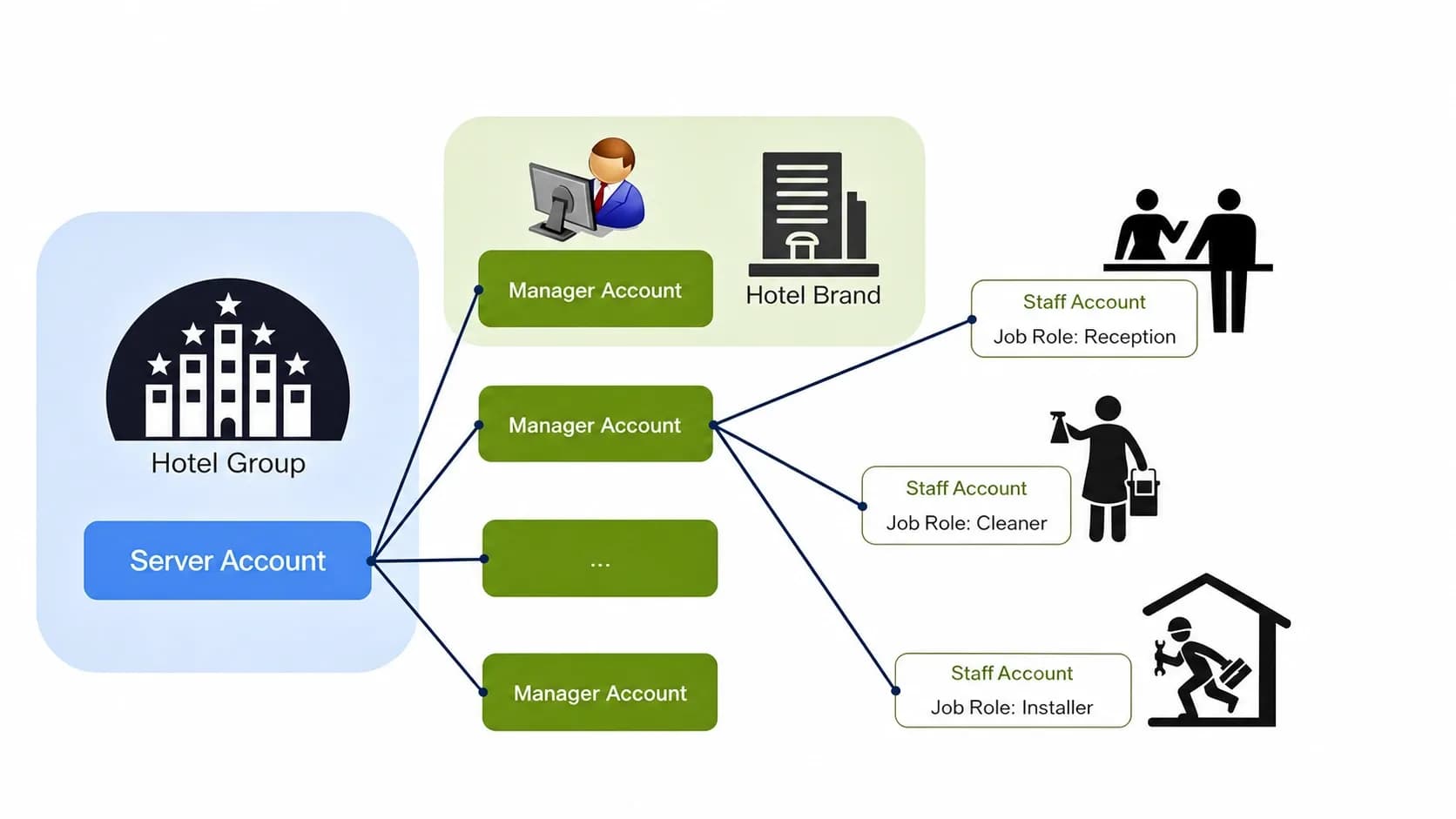
Official JoyInn account model
Define Control From Hotel Group to On-Site Staff
The dedicated JoyInn website documents the operating architecture of YOUNUO IET’s hotel system. It separates portfolio-level administration, hotel-level operation and staff execution so access can be assigned to the right property and role.
- 01Portfolio and account administration
Group Account
The master account for a hotel group. After review and approval, it can create and manage one or more hotel accounts and may connect to JoyInn cloud services through an approved API scope.
- 02Property configuration and operation
Hotel Account
The property account for one hotel. It manages hotel information, buildings, floors, rooms, public doors, elevators, devices, staff, permissions, guest check-in and hotel tasks.
- 03Role-based daily execution
Staff Account
A staff account belongs to a hotel account. One or more approved roles determine which JoyInn software surface the employee may use and which operations are available.
Roles and permission boundaries
Assign the Minimum Access Required for Each Hotel Role
The role names below follow the official JoyInn operating model. Exact functions remain subject to the selected software version, license, account owner and project configuration.
Admin / Hotel Manager
Manages the assigned hotel, room status, hotel entities, devices, staff accounts and approved permissions across the Web Console, PC FrontDesk and Admin App.
Reception
Operates the PC FrontDesk for room status, check-in, stay-period changes, checkout and supported credential issuing within the assigned property.
Housekeeping
Receives and processes assigned cleaning tasks in the Admin App without receiving property administration or guest-credential privileges by default.
Maintenance / Installation
Handles approved device activation, binding, configuration, time synchronization, testing and maintenance tasks while access to hotel and guest data stays limited.
Room Service / Voucher Check
Processes assigned service requests or subscribed voucher workflows. These functions depend on the enabled JoyInn service package and permission template.
JoyInn operating terminals
One Account Structure Across the Required Hotel Workstations
JoyInn distributes management tasks across browser, Windows and mobile interfaces. A project should confirm which terminal each role needs before accounts and devices are handed over.
Web Console
Browser-based group and hotel administration for account, property and permission configuration without a local management installation.
PC FrontDesk
Windows workstation for room status, guest check-in, supported credential issuing, hotel entities, devices, staff permissions and internal tasks.
JoyInn Admin App
Mobile management for authorized device operations, staff room-card permissions and assigned housekeeping, maintenance or service tasks.
Guest Access Interface
QR, PIN and RFID room-card workflows can be configured for the approved hotel route; Guest App or H5 delivery is confirmed per software version and project scope.
Property operating workflow
From Account Approval to Checkout and Access Revocation
The operating route should be validated end to end. Hardware selection alone does not confirm that accounts, staff permissions and guest credentials will work as required.
- 01
Approve the Group Account
Confirm the hotel group, account owner, contact email and intended software route.
- 02
Create the Hotel Account
Create each property beneath the approved group account and complete the hotel profile.
- 03
Build the Property Structure
Configure buildings, floors, room types, rooms, public doors and elevator areas.
- 04
Bind and Configure Devices
Associate locks, gateways, access controllers, elevator controls and power switches with the correct entities.
- 05
Create Roles and Staff
Assign only the required terminals, rooms, doors, task types and permission templates to each employee.
- 06
Authorize the Stay
Select the room, stay period, guest details and approved QR, PIN or RFID room-card method.
- 07
Operate, Renew or Revoke
Handle room-status changes, renewals, lost cards, checkout, staff tasks and access invalidation through the approved workflow.
Technical and commercial boundaries
Confirm the JoyInn Route Before Making Integration Commitments
This page presents YOUNUO IET’s JoyInn QR hotel system on the corporate website, while JoyInn remains the dedicated product and software website. Interface capability, deployment mode and credential behavior must be reviewed against the selected project—not assumed from a general system description.
Separate System Route
JoyInn QR and TTLock/TTHotel-compatible hotel projects are separate operating routes. Their accounts, credentials, hardware and support responsibilities must not be combined in one promise.
Guest and Staff Access
QR, PIN and RFID are the core guest-access methods described for this route. Bluetooth may be used for approved device configuration or staff operations; it is not presented here as the primary guest key.
PMS / API Review
An available API is not a completed PMS integration. Confirm the PMS vendor, version, API documents, authentication, required events, test environment, fees and responsibility split first.
Online or Offline Deployment
Gateway-based and offline device-configuration workflows behave differently. Network, clock, authorization-update and field-service requirements must be approved for the property layout.
Physical system scope
Match the Management Workflow to the Hotel Hardware
Not every project requires every device. Compatibility is confirmed by lock model, JoyInn account configuration, credential method and deployment plan.
Room Entry
YOUNUO QR hotel locks, mortise and door fit, RFID room cards and approved QR/PIN access.
Front Desk
PC workstation, card issuer and driver, and QR scanner where required by the selected workflow.
Network and Gateway
IoT gateway coverage, Wi-Fi and firewall requirements, or the approved offline configuration plan.
Shared Areas
Public-door access control, elevator controllers, staff areas and power switches where included.
System Handover
Room mapping, device binding, clock checks, staff training, software accounts and approved manuals.
Project preparation
Information Required for a JoyInn Hotel System Review
Send one operating brief covering the property, account, access and integration requirements. Final lock configuration and commercial terms are confirmed after technical review.
- 01
Property Structure
Hotel group or independent hotel, property count, rooms, buildings, floors and shared doors.
- 02
Account Ownership
Group-account owner, property managers, staff roles and required data visibility.
- 03
Guest Access
Required QR, PIN and RFID room-card combinations, stay-period rules and notification method.
- 04
Hotel Operations
Check-in, renewal, checkout, lost-card, housekeeping, maintenance and service-task workflow.
- 05
PMS / API Scope
PMS vendor and version, API documents, required events, test environment and responsible parties.
- 06
Deployment Mode
Online gateway or offline preference, network restrictions, clock handling and field-service plan.
- 07
Hardware Scope
Door specifications, encoders, gateways, scanners, controllers, elevators and power switches.
- 08
Commercial Inputs
Target market, quantity, installation schedule, training, manuals and handover language.
Buyer FAQ
JoyInn QR Hotel Lock Management Questions
Confirm the account, permission, integration and deployment assumptions before a project quotation is issued.
What is the difference between a Group Account, Hotel Account and Staff Account?
A Group Account manages one or more hotel accounts. A Hotel Account manages one property and its entities, devices, staff and operations. A Staff Account belongs to a hotel and receives role-based permissions for specific software and tasks.
Can one Group Account manage multiple hotels?
The official JoyInn account model supports one or more hotel accounts beneath a Group Account. Final property count, licenses, account relationships and data visibility must be confirmed for the approved project.
Can staff permissions be limited by role and property?
Role-based access can be planned for administrators, reception, housekeeping, maintenance, room service and voucher checking. Exact terminals, rooms, doors and operations depend on the configured permission template.
Does JoyInn automatically synchronize with any PMS?
No. PMS connectivity is a separate technical scope. It requires review of both systems, API documents, authentication, data flow, licenses, fees, test conditions and delivery responsibilities.
Can a JoyInn QR hotel project operate without continuous gateway networking?
Online and offline deployment routes are available for review, but device configuration, clock behavior and authorization updates differ. The selected route must be tested for the hotel layout and operating plan.
Can JoyInn and TTHotel be mixed in one hotel workflow?
They should be treated as separate system routes until hardware, accounts, credentials, software ownership, integrations and after-sales responsibilities are fully confirmed.
JoyInn QR hotel project review
Plan the Account, Permission and Access Workflow Before Selecting Locks
Share the property structure, required staff roles, QR/PIN/RFID workflow, device scope, PMS/API documents, target market, quantity and installation schedule for a YOUNUO IET system review.